
Exposure management starts with reachability. Can an attacker reach the vulnerable service? If so, what protection applies along that path, and what can the team change now? Those questions turn a critical PHP2Shell finding into a practical prioritization and mitigation decision.
Reach’s new app for ServiceNow Unified Security Exposure Management (USEM) brings current and achievable protection assessments and mitigation recommendations into the vulnerable-item workflow. Through our partnership with ServiceNow, we are connecting decisions about existing controls to the work teams already manage in ServiceNow.
ServiceNow provides the vulnerable item, CMDB context, prioritization, and remediation coordination. Reach adds evidence about applicable controls and the changes available to strengthen them.
Establish reachability before deciding what needs attention
In this product walkthrough, ServiceNow vulnerable item VIT25010294 connects CVE-2026-109619 to a Linux host ending AG2A. The item is Critical and Open, and the asset is marked Internet Facing. Its record number connects the finding, affected asset, and ensuing work in one place.
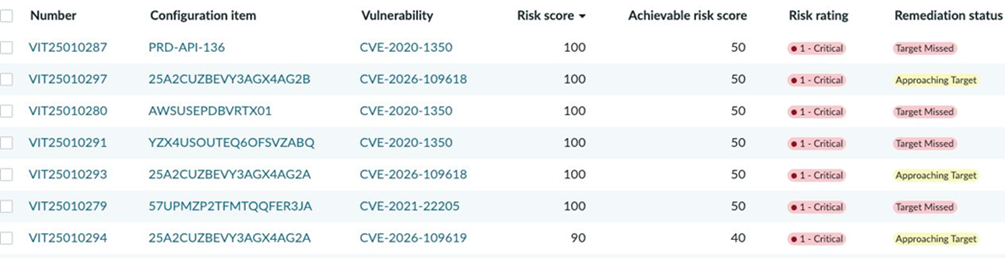
That flag directs the investigation. Establish the affected service, the relevant attacker origin, and the route between them. Review the rule that allows or denies the connection and the controls that inspect it. A host’s internet-facing designation alone cannot establish the reachability of every service or path.
For an allowed path, evaluate the exposure that remains under current controls. A service can stay reachable for legitimate use while an applicable control interrupts an exploit attempt. If access is restricted from one origin, assess other relevant origins before deciding the priority. Reach evaluates whether controls are enforcing in the relevant path and capable of mitigating the exploit. A compensating access rule can make the service unreachable from a denied origin. On a route that must remain open, an applicable prevention control can block the exploit attempt instead.
That distinction changes the response queue. An allowed route with an ineffective inspection policy deserves an immediate mitigation decision. A route denied from the assessed origin requires confirmation that the restriction remains effective and review of other relevant paths. Both cases retain their software-remediation needs. The vulnerable item gives teams a place to document the evidence behind that choice.
See current risk and achievable improvement together
The list shows a current risk score of 90 and an achievable risk score of 40 for VIT25010294. Inside the record, Compensating Controls Summary - Reach describes the current action as None and effectiveness as Ineffective. Its achievable assessment shows Prevent and Effective. The item remains Critical and Open.
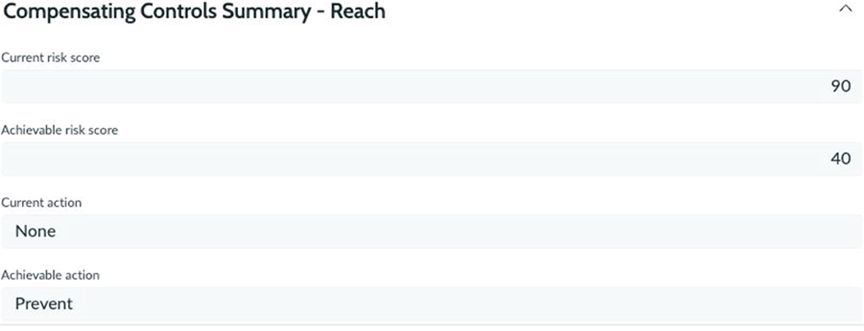
Together, those fields identify a gap and an opportunity. The current assessment supports today’s decision. The achievable assessment describes stronger protection available through changes that still need to be evaluated, implemented, and verified.
These values are configured prioritization scores, separate from CVSS and from a measured probability of exploitation. The gap between 90 and 40 identifies an opportunity to improve protection. Credit for that improvement depends on implementing the necessary changes and obtaining a fresh assessment.
Explain why the item receives its priority
ServiceNow supports configurable risk criteria and weights. In this record, the work notes expose the calculation behind Reach: Default Risk Rule, making the assessment’s contribution visible.
An Ineffective Reach assessment carries a 50% weight and contributes 50 points. Exploit = Yes carries a 10% weight and contributes 10. Severity = High carries a 40% weight and contributes 30. The resulting total is 90.
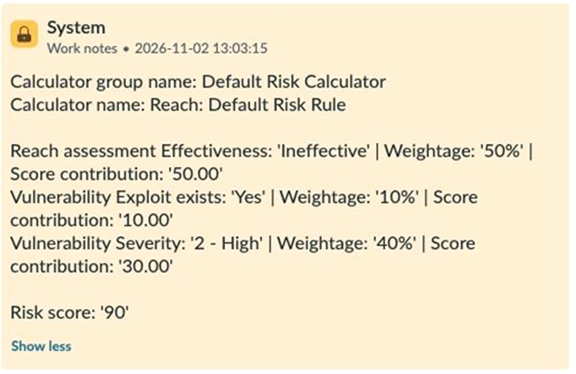
These weights belong to the rule configured in this example. The organization determines how control evidence should influence priority alongside its other risk criteria. An ineffective assessment can reinforce urgency, while verified effective protection can inform a different response.
This makes the priority explainable to the teams receiving the work. They can see how the configured rule incorporates the Reach assessment alongside vulnerability information, then inspect the control evidence and proposed action behind it.
Count protection that applies to the affected host
The Compensating Controls - Reach tab contains five entries. Three specific CrowdStrike capabilities, Force ASLR, Hardware-Enhanced Exploit Detection, and Heap Spray Preallocation, are marked Not applicable. Two PAN-OS inbound-inspection entries are marked Partially effective, with Enabled on this host set to Yes and the action Prevent.
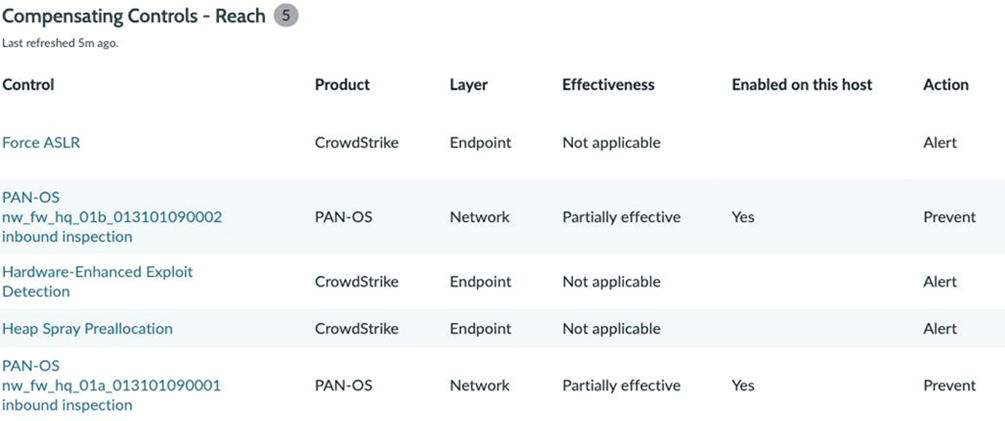
These entries give the analyst a more useful question than whether a security product is present: does this particular capability apply to the affected host and the relevant attack path?
An inapplicable capability cannot support the protection claim for that assessment. Likewise, an enabled prevention label must be read alongside the effective policy, exceptions, and traffic path. The PAN-OS entries lead the investigation toward the specific configuration gaps that Reach identifies.
Give the firewall owner a precise change to review
One of the record’s 14 recommendations is a Preferred PAN-OS Network action: change the threat exception for CVE-2026-109619 in profile VP-WEB-GENERAL-PHP02.
The recommendation identifies an exception setting 24 listed threat IDs to Allow and proposes changing their actions to reset-both.An applicable threat exception overrides the profile’s general signature action. Network access rules and routing separately determine whether the service can be reached.When an applicable signature detects matching TCP traffic, reset-both resets the connection at both the client and server.
The scope is explicit. The profile is defined in the Global device group, pushed to four firewalls, and used by one rule on the observed firewall. That shared scope matters when reviewing the change’s operational impact. The owner needs to consider affected uses across the deployment before changing the profile.Review the rules and applications using that shared profile, confirm that inspection sees the relevant traffic, and agree on verification before deployment.

The recommendation provides the Panorama procedure: open Objects, select Global, then navigate to Security Profiles > Vulnerability Protection > VP-WEB-GENERAL-PHP02 > Exceptions. Set the specified threat IDs to reset-both, then Commit and Push through the approved change process.
The owner receives a named policy object, a specific setting, and a defined deployment scope. Protection still depends on the relevant traffic traversing the applicable inspection path. This recommendation is one component of the item’s broader assessment; establishing the achievable score requires addressing the necessary gaps and reassessing the resulting protection.
Carry the mitigation decision through the remediation workflow
ServiceNow supports remediation tasks that connect selected vulnerable items to responsible assignment groups. Teams can use that workflow to carry the reviewed mitigation action to its owner, alongside the software-remediation work.
A useful handoff identifies the affected service and assessed origin, the control gap, the proposed change, shared-policy scope, and the evidence needed to verify the result. After implementation, check the deployed configuration and resulting inspection behavior, reassess the item, and record the evidence supporting any revised priority. Record the configuration version and assessment timestamp so the next reviewer can connect the mitigation decision to the state that was checked.
In this example, current risk remains 90 and the item remains Open. Retain that current assessment while the proposed changes move through the workflow, then use fresh evidence to support a revised priority. Compensating controls can address immediate exposure while the team continues patching the vulnerable software.
Keep the assessment current as protection changes
A changed access rule, inspection exception, or policy assignment can alter the protection behind a priority. Reach’s configuration drift capabilities help teams identify relevant changes and investigate their effect.
It’s important for teams to reassess when things change and when evidence expires. Continue software remediation while using applicable controls to address immediate exposure.
Our partnership with ServiceNow brings Reach’s control evidence into the place where teams prioritize and coordinate remediation. Use the new Reach app to connect reachability and current protection to a specific mitigation decision, with the affected asset and vulnerable item as the shared context.
Analyze this article with AI
Prompts open in third-party AI tools.