
Key Takeaways:

Reachability determines exposure. Two systems with the same vulnerability can face very different levels of risk depending on their configurations and existing protections.

Existing controls can block exploits. Palo Alto Networks security controls can mitigate vulnerabilities by blocking attack traffic or restricting access to vulnerable systems.

Reach identifies where defenses fall short. Reach assesses attack paths, firewall rules, and protection gaps to pinpoint where vulnerable systems remain exposed.

Mitigate vulnerabilities before patches are applied. Reach recommends specific compensating control changes to close exposed attack paths and reduce risk while patching is underway.
On October 29, Palo Alto Networks confirmed active exploitation of critical PHP2Shell vulnerabilities targeting internet-exposed PAN-OS management interfaces. Its Unit 42 researchers also verified attacker tooling used to chain these vulnerabilities with a Linux kernel privilege-escalation vulnerability.
The attack involved three vulnerabilities:
- CVE-2026-109618: Remote code execution vulnerability.
- CVE-2026-109619: A second remote code execution vulnerability.
- CVE-2026-46300 (Fragnesia): A Linux kernel vulnerability used to escalate privileges to root.
Attackers could exploit PHP2Shell to execute code on vulnerable firewalls, then exploit the Linux kernel vulnerability to obtain root-level access.
The following day, security firm Intruder published independent research demonstrating PHP2Shell code execution in a PAN-OS lab environment.
With exploitation underway, security teams need answers they can act on: Which vulnerable systems can attackers actually reach? And where could existing Palo Alto Networks controls block the exploit while teams work to apply patches?
Same vulnerability, very different exposure
Consider two hypothetical PHP services running the same vulnerable build. This simplified example shows how firewall policy changes the risk of an attack reaching a service. It is not a reconstruction of the reported PAN-OS management-interface attacks.
The first is a customer-facing application that accepts HTTPS traffic from the internet. Its traffic matches a Palo Alto Networks security rule that allows the connection, but the associated Vulnerability Protection profile only generates an alert for the PHP2Shell signature. A stronger blocking rule sits farther down the rule list. Because the earlier rule already matches the traffic, the stronger rule never takes effect for this connection.
The second is an internal reporting application. Internet-origin traffic is denied, although systems on an application subnet can still reach it. Along that internal path, the relevant inspection is enabled and the matching exploit signature is configured to block.
Both applications still need software fixes. But the first has an exposed path where a detected exploit may not be stopped. The second is unreachable from the internet origin in this example, with blocking protection on the assessed internal path. Other potential origins still need to be checked before drawing conclusions about its overall exposure. Security teams should also consider business impact and the confidence of the available evidence when deciding which exposures to address first.
See which firewall rule handles the traffic
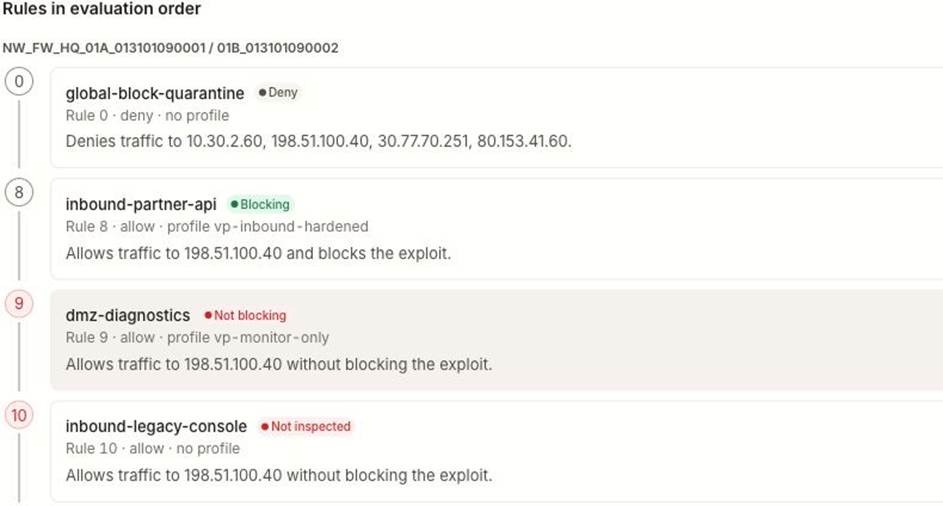
Reach’s Exposure Intelligence view helps the analyst follow the path from a potential attacker origin, through the firewall, to the affected host. Select the CVE and host, and Reach shows the relevant rules in the order Palo Alto evaluates them, including which rule actually handles the traffic.
Of course, the order of those rules are relevant – a rule labeled “Blocking” might look reassuring, but it provides no protection for a connection already allowed by an earlier, alert-only rule. Similarly, a rule without inspection can allow traffic through without checking for the exploit.
The outcomes in Reach allow you to see visible differences: “Deny” means the assessed origin cannot use that path; “Blocking” means the applicable control is configured to stop matching exploit traffic; “Not blocking” and “Not inspected” identify gaps in prevention or inspection. “Never fires” flags a rule that the traffic never reaches because an earlier rule determines the result.
See the exposure today and what could improve
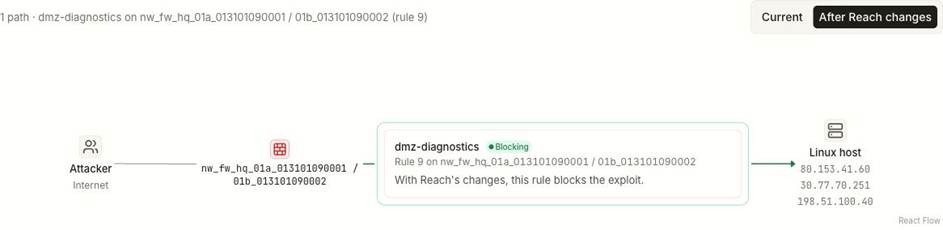
Reach then connects the finding to a practical next step. Current Exposure shows the assessment based on the controls in place today. Achievable Exposure shows the improvement Reach expects from specific, proposed configuration changes.
For the internet-facing application in our example, the question becomes straightforward: Can we keep the application available to legitimate users while making its firewall rule block the PHP2Shell exploit? Reach can identify the existing control change that would make that possible.
Use the Palo Alto controls already in place
Palo Alto Networks initially published PHP2Shell protections that included Threat IDs 543004 and 97622–97625. Its advisory subsequently listed additional coverage. Teams should check the latest advisory and confirm the applicable Threat Prevention content is installed before relying on a signature.
The next step is to inspect the Vulnerability Protection profile attached to the rule that handles the traffic. Is the PHP2Shell signature set to block or just alert? Is there an Allow exception overriding the intended action? For HTTPS, where does TLS terminate, and can the firewall inspect the traffic it needs to evaluate? Even a correctly configured signature cannot block an exploit request it never sees.
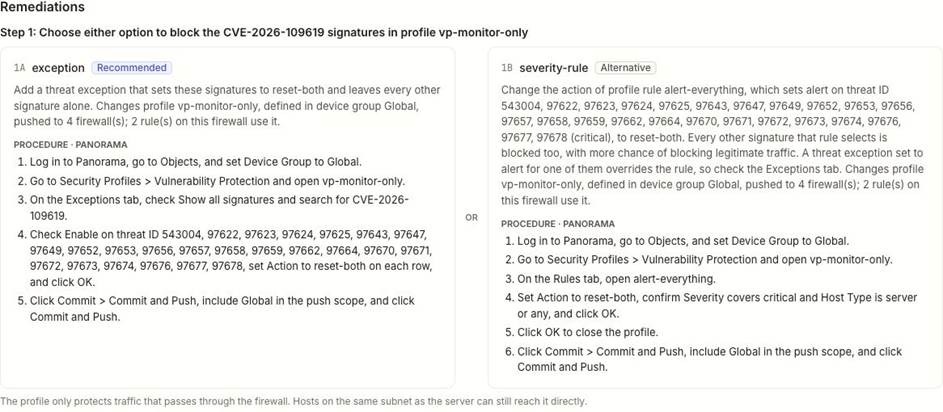
Depending on the gap it finds, Reach can recommend changing an alert-only signature to a blocking action, correcting an Allow exception, attaching a missing Vulnerability Protection profile, or reusing a stronger profile already in the environment.
In the example shown below, Reach offers two ways to address the finding: a targeted signature exception using the “reset-both” action, and a broader severity rule change. “Exception” allows an administrator to override the default profile action for a specific threat signature, including setting that signature to block. The broader option can affect more signatures, so Reach also shows the implementation steps and the scope of any shared profile or device group before the team chooses an approach.
Sometimes the strongest fix is to remove an unnecessary path entirely by restricting which sources can reach the service. When the application needs to remain accessible, strengthening the applicable Vulnerability Protection action can block matching exploit traffic while preserving required access.
Preview the change, then verify it works
In this example, the proposed configuration changes the assessed rule's protection status from “Not blocking” to “Blocking” for the relevant exploit. The security team can see the intended effect before approving the change.
That preview is a model of the proposed configuration. Teams still need to apply the approved change, commit it to the relevant devices, verify that Threat Prevention content and inspection are in place, check the threat logs, and reassess exposure.
Let’s also discuss the path itself. Hosts on the same subnet may communicate without crossing the firewall shown in Reach. Blocking one assessed path does not guarantee that every possible path to the vulnerable service is covered.
Don’t overlook the firewall’s management interface
The real-world PHP2Shell attacks focused on internet-exposed PAN-OS management interfaces. Those interfaces must be checked separately from the application paths in our example. A transit-traffic policy cannot be assumed to protect the firewall’s own management service.
Palo Alto Networks recommends restricting management access to trusted internal sources and applying the appropriate PAN-OS fix. For organizations using threat inspection on management traffic, its advisory also describes prerequisites that include data-plane routing, a replacement inbound certificate, decryption, and enabled Threat Prevention. Those conditions need to be validated before relying on that protection.
Keep exploits out until patches go in
When a new vulnerability is being actively exploited, the first challenge is finding the systems attackers can reach and understanding whether existing defenses will stop the attack. Reach brings that information together with recommended Palo Alto Networks control changes, including rule-conflict analysis, profile assessment, and configuration drift detection.
The result is a clearer path from a newly disclosed CVE to a specific action: identify the reachable service, see the protection gap, choose an existing control change, and verify its effect. Compensating controls can reduce exposure while patches are tested and deployed.
Explore Reach’s Palo Alto Networks integration.
Learn how Reach mitigates vulnerabilities with compensating controls.
Existing Reach customers can start in Exposure Intelligence. To see Reach in action, request a demo.
Analyze this article with AI
Prompts open in third-party AI tools.