13 Drift Events a Day: See How Much Drift Is Already Happening in Your Environment
Get the report

The Microsoft Defender Security Research Team and Microsoft Threat Intelligence documented a campaign in which Storm-2949 abused Microsoft Entra ID accounts to exfiltrate data from Microsoft 365 and Azure environments. The attack shows how cloud intrusions increasingly unfold through identity systems, administrative features, and legitimate platform capabilities rather than obvious malware or traditional endpoint compromise.
According to the report, the attackers used compromised identities to move across SaaS, PaaS, and IaaS layers while blending into normal cloud activity. Once they had access, they used Microsoft Graph API queries, cloud management functions, and administrative operations to enumerate users, applications, privileged identities, service principals, storage resources, databases, virtual machines, and other cloud assets.
The campaign reportedly started with targeted social engineering tied to Microsoft’s Self-Service Password Reset (SSPR) process. Attackers impersonated internal IT support staff, persuaded users to approve fraudulent MFA prompts, reset passwords, removed existing authentication methods, and registered their own devices as authenticators.
Microsoft said the same technique was repeated across multiple users, including IT personnel and senior leadership. The attackers appeared to understand which identities could help them advance access, reach sensitive systems, or unlock additional administrative paths.
After compromising identities, Storm-2949 moved deeper into Microsoft 365 and Azure. The attackers accessed OneDrive and SharePoint to identify and download sensitive files, including documents related to VPN configurations and remote access procedures. From there, the campaign expanded into Azure resources such as App Services, Key Vaults, Storage accounts, SQL databases, and virtual machines.
Much of the activity involved legitimate administrative capabilities. The attackers accessed publishing profiles, manipulated Key Vault access configurations, retrieved secrets, modified storage account network settings, listed storage account keys, changed SQL firewall rules, and abused Azure VM features such as Run Command and VMAccess. In one sequence, Microsoft said the attackers accessed dozens of Key Vault secrets in four minutes, then used those secrets to pursue access to a production application.
The attack path depended on a chain of security control gaps across identity, SharePoint access, endpoint protection, application control, and event visibility. Each misconfigured security control gave the attackers an opening and more room to move after the initial identity compromise. Let’s take a closer look at the security controls mapped directly to the steps that Storm-2949 actually executed, and how proper configuration could have likely thwarted forward progress for Storm-2949.
Storm-2949’s initial access depended on abusing SSPR and MFA workflows and weakened security controls. Hardening the following Microsoft Entra ID Conditional Access controls could have helped:
Reach can identify when these types of policies are missing, mis-scoped, or not enforced for the right high-risk users and applications, and remediate to correct the policy gap and monitor for drift when authentication strength, device compliance, or session control settings change over time.
Storm-2949 accessed OneDrive and SharePoint to find and download sensitive files, including documents related to VPN configurations and remote access procedures. Hardening the following Microsoft Sharepoint controls could have helped:
Reach can proactively identify these types of security control blind spots, like SharePoint sites where unmanaged device access is allowed, sensitive content exposed to overly broad groups, or if restricted access policies are missing. From there, Reach can correct the misconfiguration and continuously validate that site permissions, sharing settings, and access restrictions stay aligned to policy.
Storm-2949 also abused Azure virtual machines and used administrative capabilities to support persistence and further credential access. The attack path included script activity, VMAccess extension abuse, Run Command execution, and ScreenConnect installation on Azure VMs. Microsoft Defender for Endpoint and Intune controls map directly to this stage, and hardening the following Microsoft Defender for Endpoint controls could have helped:
Reach can rapidly identify and remediate these control misconfigurations, help validate whether Tamper Protection is properly deployed through Intune, whether known IOCs are blocked, whether application control is actually enforced, and whether event forwarding is configured. If endpoint controls weaken over time, Reach detects the configuration drift, including when allowlists become too permissive, or logging coverage changes.
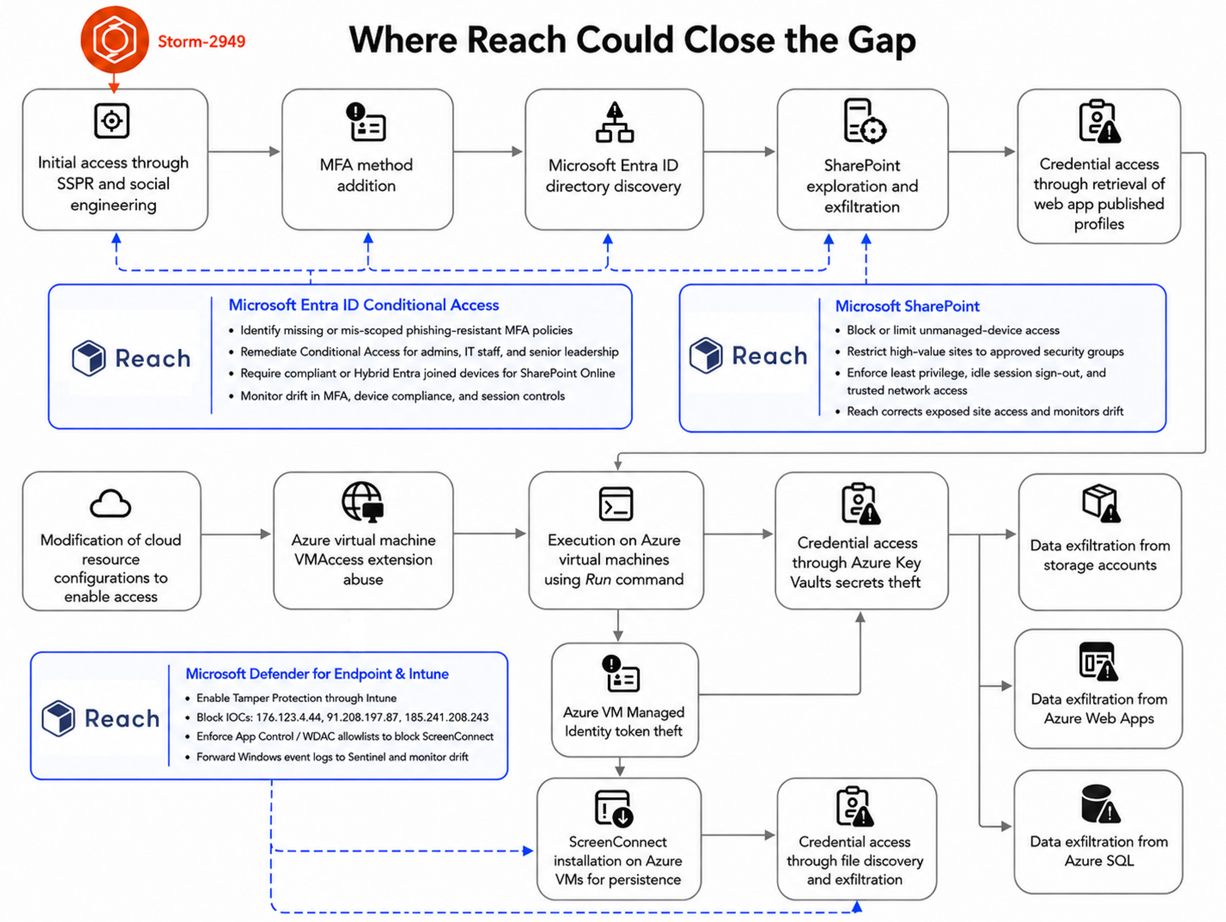
Storm-2949 shows how legitimate administration can become the attack path when controls are misconfigured, misaligned, or inconsistently enforced. Conditional Access policies change, SharePoint sites accumulate permissions, and temporary exceptions can become permanent. Endpoint settings drift, allowlist policies weaken, and logging pipelines break or get scoped too narrowly.
Security teams need to know when those changes create exposure. The practical lesson is to harden the controls that map to real attack paths, remediate the gaps that give attackers room to move, and continuously validate that those controls stay aligned to policy before a compromised identity becomes a broader cloud intrusion.
Unlock the full power of your security stack with a free tool rationalization assessment.
Request a Demo

Read-only API key for a security tool of your choice

Create your account and setup the integration

Get results across licensing, control mapping, risk exposure, and posture